Beta knowledge base
YE(X)EY
A private macOS record book for every car you actually care about. Fuel, maintenance, inventory, compliance, diagnostics, planning and a resale-ready report — all kept in a local SQLite store on your Mac and synced over the LAN with an iPhone companion that talks to an ELM327 adapter for live OBD readings. No cloud, no account, no telemetry.
Why YE(X)EY
What you get for the effort of logging
Logging a car takes minutes and pays back in years. Every entry becomes a receipt for the future: for the buyer who asks, for the mechanic who diagnoses, for the you who forgot when the timing belt was actually changed.
| You will sell this car one day | A vehicle without records sells at the "unknown history" discount. YE(X)EY produces a dated, mileage-anchored PDF of every service, fill-up and compliance event — the same document a serious buyer or dealer asks for. |
|---|---|
| Maintenance intervals actually get respected | Oil, brakes, tyres, timing belt, service — each has a mileage/time target. The Health score turns those intervals into a green/amber/red signal instead of a mental note you will forget in 8 months. |
| MOT, tax and insurance stop expiring unnoticed | Every compliance record has an expiry date and a configurable reminder window. macOS notifications fire ahead of the deadline. Monthly instalments are tracked separately from single-payment policies. |
| Every part you buy has a paper trail | Inventory tracks brand, part number, supplier, purchase date, quantity and unit price down to £0.001 per ml. When you use it in a job, the consumption is linked to that maintenance event — not typed twice. |
| OBD data belongs to your vehicle, not to a cloud | The iPhone companion talks to any ELM327 (Bluetooth or Wi-Fi), captures live RPM, coolant, throttle, voltage and DTC codes, and sends the session back to the Mac over your local Wi-Fi. Nothing leaves the LAN. |
| Signed updates, sandboxed app, local SQLite | The app is App Sandboxed. Data lives in a local SQLite store, not on a server. Updates ship through Sparkle with an EdDSA signature — no telemetry, no account, no cloud lock-in. |
Download
Latest beta release
YE(X)EY 0.3.0 for macOS
Direct DMG download. Sparkle picks up subsequent updates from the same feed. First launch shows a Gatekeeper warning until Apple notarization lands — right-click → Open once and macOS will remember it.
Product
What it records
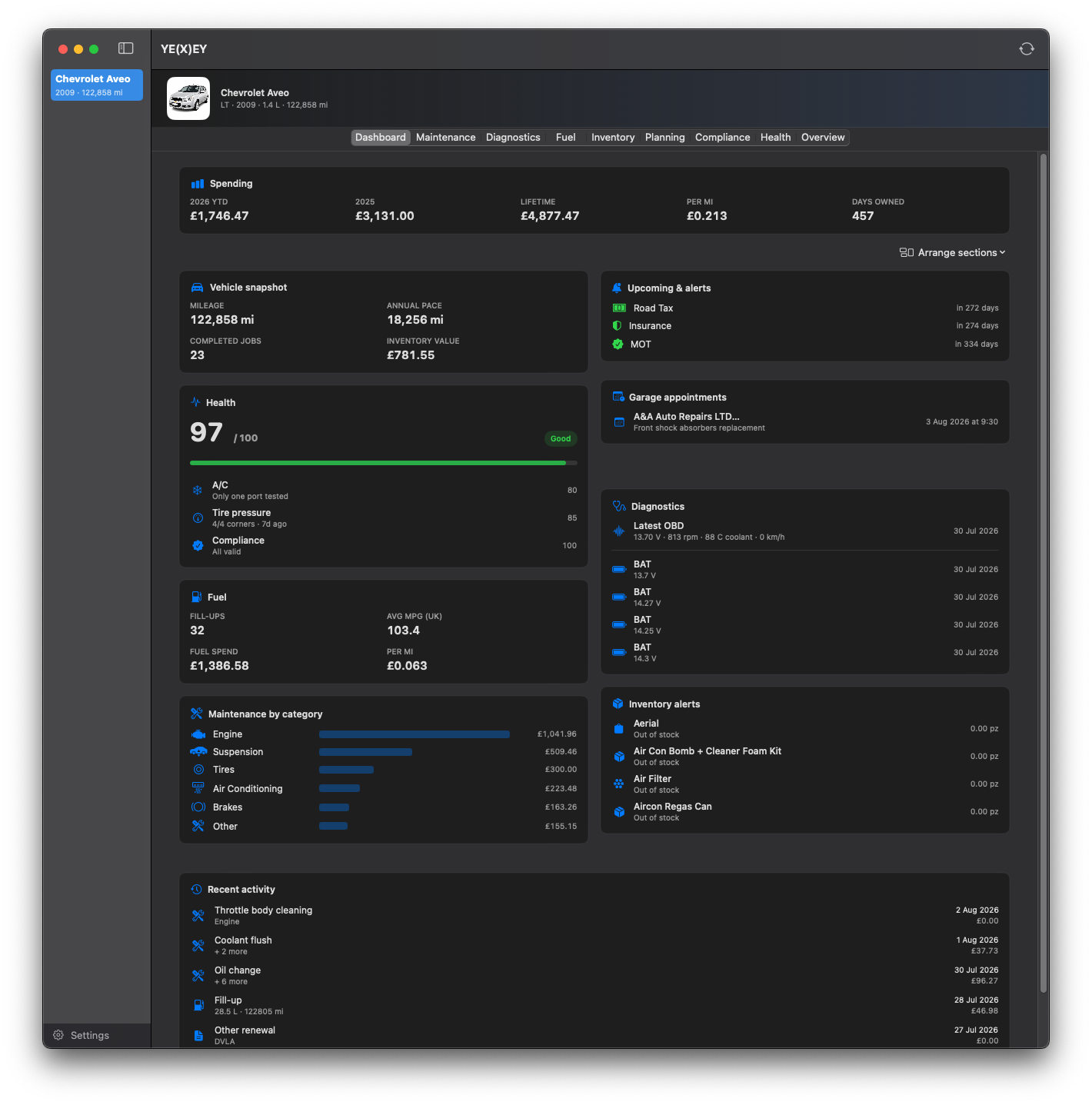
| Fuel log | Fill-ups with date, mileage, litres, cost, station and fuel grade. Full-tank vs partial detection. MPG and cost-per-mile computed per vehicle. Missing mileage estimated from surrounding fills, never below the purchase-mileage floor. |
|---|---|
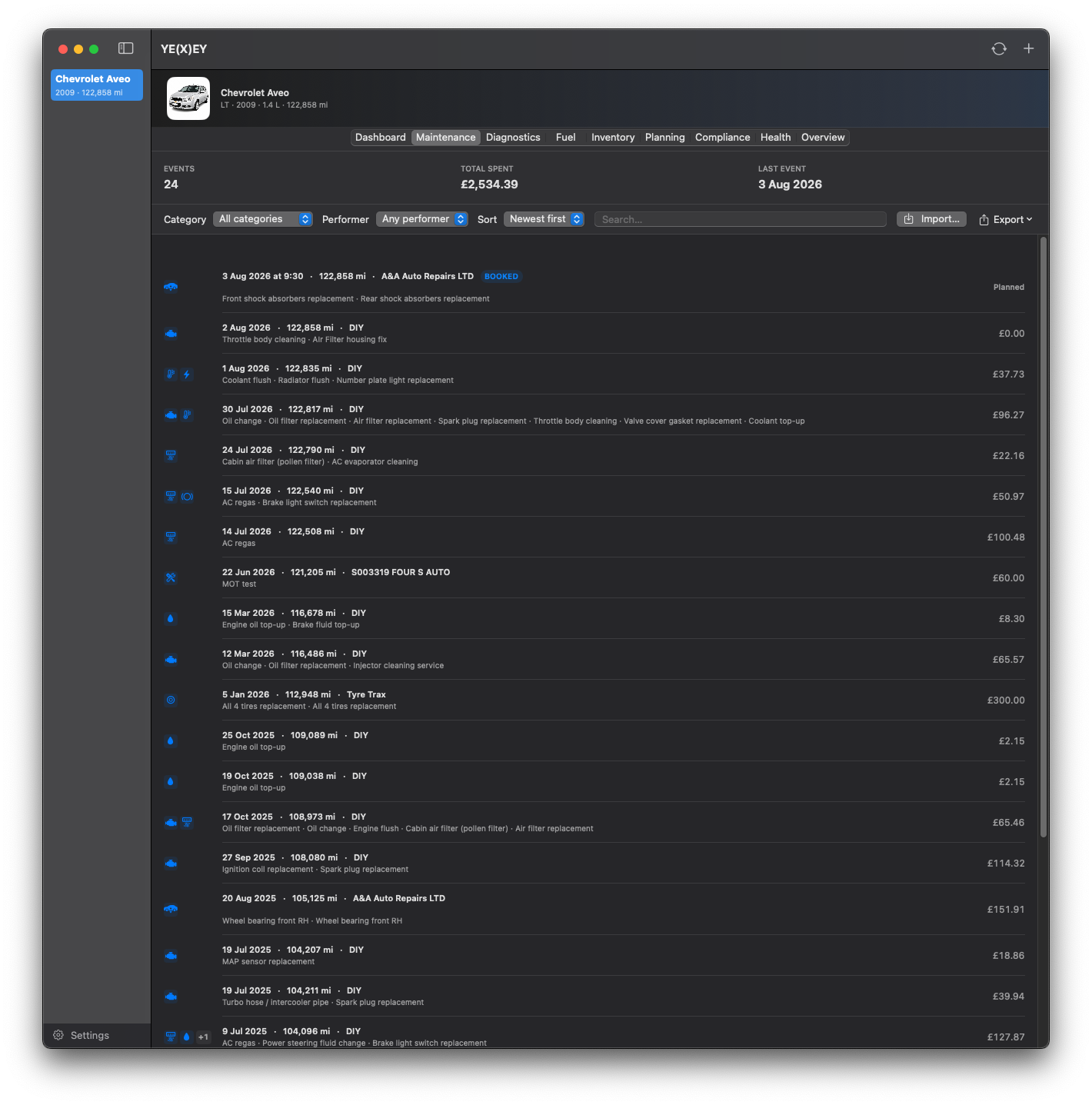
| Maintenance | Structured event log: date, mileage, category (engine, cooling, brakes, suspension, electrical, AC, tyres, fluids, bodywork, transmission), DIY or garage, workshop, hours, cost, receipt. Job catalog with 500+ templates and per-job tags feeding the Health score. |
| Garages catalog | Dedicated window (File → Garages…, ⌘⇧G). Name, address, phone, email, website and a tag set for the services each workshop offers (MOT, aircon, tyres, auto electrician, general…). Contact icons are tappable straight from the maintenance form. |
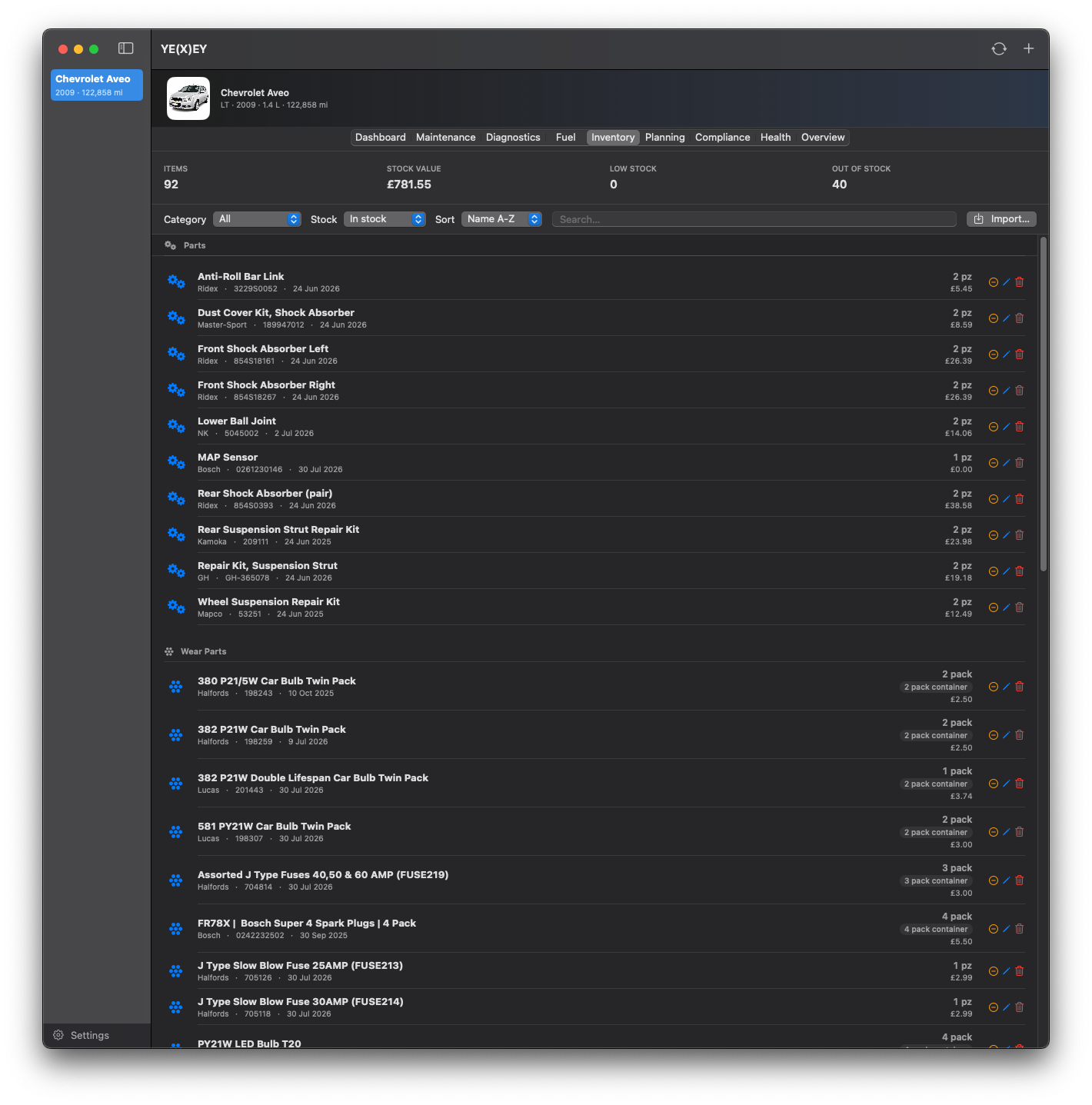
| Inventory | Consumables, fluids, tools, parts. Pre-filled containers (5 L bottles, 4-pack plugs) auto-calculate per-unit price. Quantities are integer for discrete items and fractional for fluids. Every usage is attributed to the maintenance event that consumed it. |
| Compliance | MOT, road tax, insurance, service and custom records with provider, policy number, cost and expiry. Configurable reminder window with macOS notifications. Single-payment or monthly-instalment schedules with day-of-month. |
| Diagnostics (manual) | Timestamped readings for tyre pressures (FL/FR/RL/RR), battery voltage, lamp status and A/C, each with numeric value, unit and pass/warning/fail/critical state. Kept per vehicle with date and mileage. |
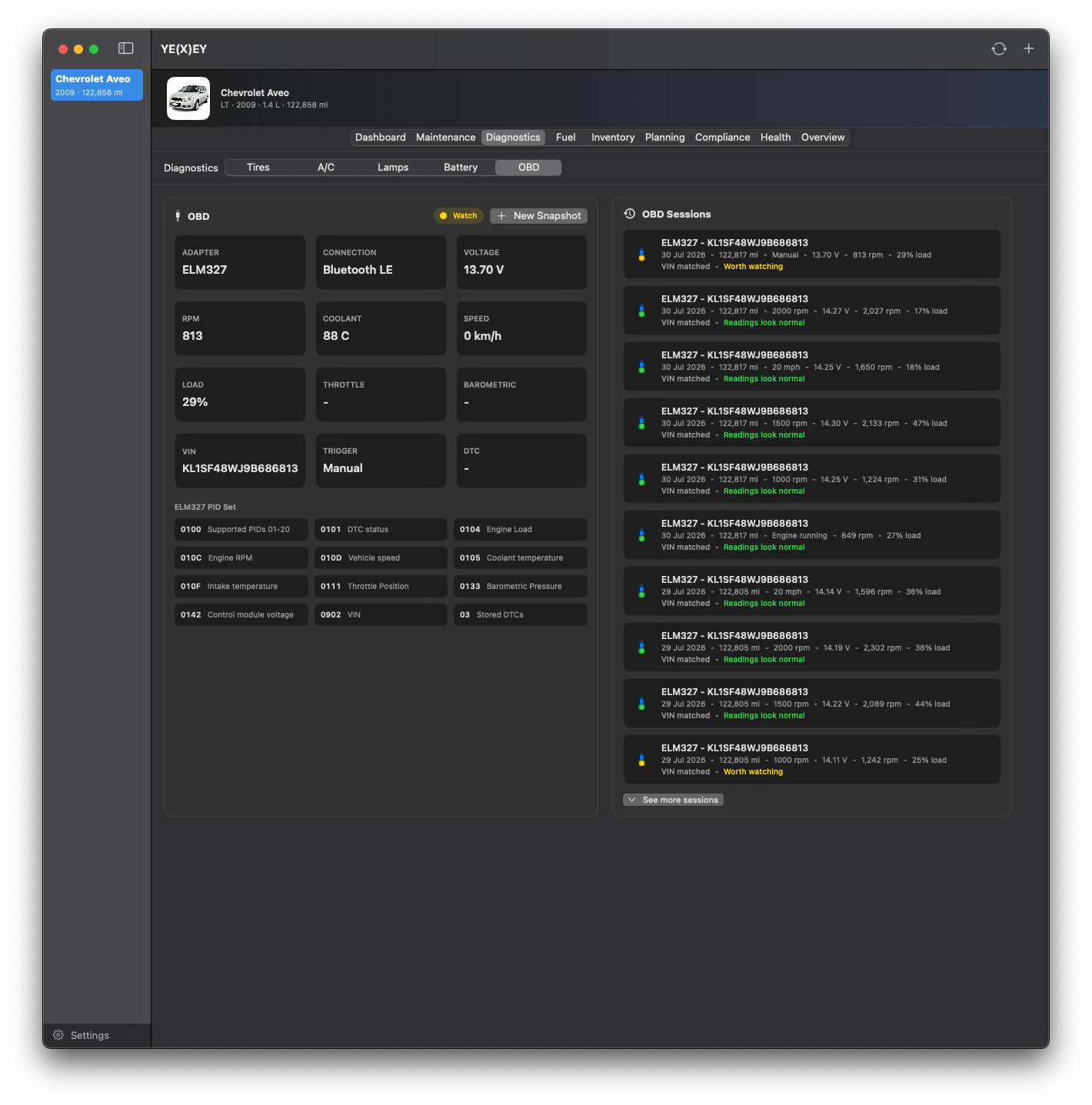
| OBD (via iPhone companion) | Live PIDs: RPM, vehicle speed, coolant temp, intake temp, throttle position, barometric pressure, battery voltage, DTC status, VIN. Auto-capture at 3000 rpm and 40/50/70 mph. Shift guidance from RPM+load. Sessions are timestamped and attached to the desktop vehicle on sync. |
| Planning (Shopping List + To-Do) | Shopping List queues parts you plan to buy with supplier, priority and estimated price; marking an item purchased promotes it into Inventory (or tops up an existing item). To-Do queues upcoming jobs with target date and mileage; marking one done creates a full Maintenance Event in one tap. |
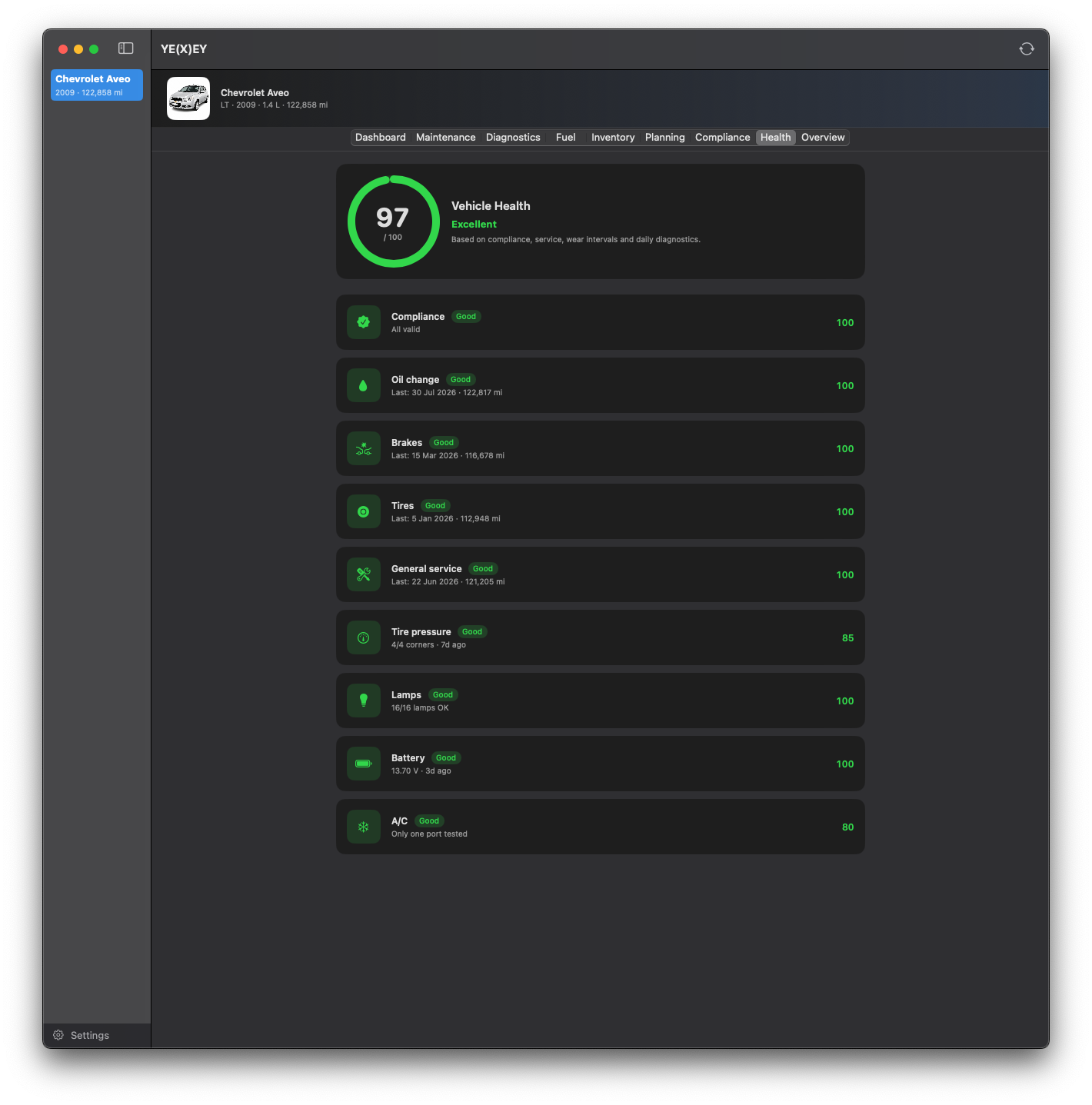
| Health score | Composite indicator combining compliance validity (MOT, tax, insurance) with mileage/time intervals for oil, brakes, tyres and service. Reads job tags from the catalog and inventory consumption so it stays accurate without manual bookkeeping. |
| Resale report (PDF) | One-click ownership PDF: vehicle spec (make, model, year, engine, VIN, registration, fuel, transmission), full maintenance timeline, fuel economy stats, compliance status and Health score. The document you hand to a buyer or a mechanic. |
| Backup | Full JSON export (.yexeybackup) covering vehicles, maintenance, fuel, inventory, compliance, diagnostics, OBD sessions and planning. Schema-versioned with app version and export timestamp. Import merges by ID with a per-record last-writer-wins policy. |
| Sparkle updates | EdDSA-signed appcast at /appcast.xml. Delta updates for the last five builds keep downloads small. Daily automatic check plus a manual "Check for Updates…" menu item. Public key is embedded in Info.plist; private key stays in the macOS Keychain. |
Screenshots
The app, running on a real car
Every screenshot below is from the same 2009 Chevrolet Aveo the app is being dogfooded against — real jobs, real parts, real OBD sessions. No mockups, no marketing renders.
iPhone companion
The car in your pocket, wired to the desktop
The companion is an iPhone-only app (iOS 17+). It reads the vehicle's data model straight from your Mac over Bonjour and lets you edit the parts that actually make sense to touch from the driveway or a workshop lift.
| Editable on iPhone | Shopping List, To-Do, manual diagnostics (battery, lamps, tyre pressure, A/C), live OBD dashboard. Every edit syncs back to the Mac. |
|---|---|
| Read-only on iPhone | Vehicle overview (photo, VIN, engine, displacement, purchase), maintenance log, fuel log, inventory, compliance and Health score. |
| OBD hardware | Any ELM327 adapter over Bluetooth LE or Wi-Fi. No cloud pairing, no account, no vendor SDK — direct socket to the adapter. |
| Sync transport | Bonjour service _yexey-sync._tcp on the local network. Desktop advertises, iPhone connects, both push the current snapshot on demand. No relay server. |
| Deletions | Vehicle deletions are recorded and propagated on the next sync, so removing a car on one device removes it from the other. |
Privacy & trust
Local by construction, not by policy
Every architectural decision points inward: the data lives on your machine, the sync stays on your LAN, the updates are cryptographically signed. There is nothing to opt out of because there is nothing collecting.
| Storage | Local SQLite via SwiftData, inside the App Sandbox container. No cloud database, no iCloud sync. |
|---|---|
| Network | Bonjour on the LAN only. No outbound calls to a backend. The only external endpoint is the Sparkle appcast when checking for updates. |
| Account | None. There is no login, no user ID, no server-side identity. Uninstalling the app removes the data. |
| Analytics | The app itself ships no analytics. The marketing site uses Cloudflare Web Analytics (aggregate, cookieless). |
| Update integrity | Sparkle 2.6+ verifies every update with EdDSA. Public key in Info.plist, private key in the developer's macOS Keychain. |
| Apple Developer ID | Not yet. The DMG is signed to run locally and will show a Gatekeeper warning on first launch — right-click → Open to bypass. Notarization is on the roadmap. |
Release log
What has shipped
0.3.0 — Planning tab
Shopping List for parts you plan to buy (promoted straight into Inventory when purchased) and To-Do for upcoming jobs (logged as a full Maintenance Event in one tap). Both editable from the iPhone companion, synced bidirectionally, included in backup.
0.2.19 — Garages catalog
Dedicated window (File → Garages…, ⌘⇧G) to save trusted workshops with contact details and tagged services. The maintenance form pulls from the catalog and lets you add a new garage inline.
0.2.18 — Blueprint splash + inventory backfill
New splash screen. All 0.2.17 inventory improvements confirmed: pre-filled containers, multi-piece packs, per-unit precision, per-unit quantity rules in maintenance.
0.2.17 — Container-aware inventory
Pre-filled containers (5 L bottles) and multi-piece packs auto-calculate per-unit price. Maintenance enforces whole pieces for discrete items and keeps fractional precision for fluids down to £0.001/ml.
0.2.16 — Companion vehicle overview
Companion Records gains a vehicle Overview tab with VIN, engine, displacement and purchase details. Desktop battery panel keeps every reading inside its diagram.
0.2.15 — Icon refresh
Desktop and companion icons switch to a clean Apple-style squircle with transparent corners.
0.2.14 — Sync deletions + mobile edits
New YE(X)EY icons. Long-press vehicle editing and deletion on mobile. Sync now preserves vehicle removals across devices.
0.2.13 — Selection stability + web analytics
Desktop keeps a valid vehicle selected after companion sync/import. Cloudflare Web Analytics added to the marketing site.
0.2.12 — Companion dashboard
Companion gains a vehicle dashboard, clearer bidirectional sync state, fixes for dashboard clipping and easier full-row diagnostic entry.
0.2.11 — Sync polish + booked appointments
Desktop re-sync asks the companion for current data. Lighter dashboard sections. Maintenance supports booked garage appointments.
0.2.10 — Companion readings sync fix
Diagnostic readings sent from mobile now attach to the matching desktop vehicle instead of disappearing after import.
Sparkle updates enabled
The public EdDSA-signed feed is live. Users get incremental delta updates from any recent build.
Roadmap
What is not shipped yet
- Apple Developer ID notarizationRemove the Gatekeeper first-run warning by notarizing the DMG. Pending business registration.
- ELM327 on macOSMove live OBD out of the iPhone-only companion by driving Bluetooth or Wi-Fi ELM327 adapters natively from the Mac.
- LocalizationThe app is UK-oriented today (GBP, MOT/DVLA, miles). Currency, region, unit and compliance-type localization is the next horizontal pass.
- Attachments libraryExtend receipts to a proper attachment library for photos, service bulletins, ownership documents and inspection reports.
- Service predictionPredict next-due jobs from mileage cadence, driving habits and previous interval history — beyond static reminders.